
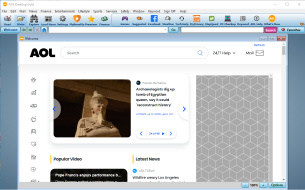
AOL Desktop is back with a new Beta!
AOL's premier all-in-one software is back in beta with an ALL NEW version and we want your help to test it.
Join our beta by visiting the AOL Desktop beta page to learn more about this beta and how to get involved.
LATEST NEWS
This update contains fixes that were discovered through beta tester feedback and contains some of the most requested features. If you like what you see, or want to vote for the next feature to be added, drop us a line of feedback!
November General Updates
November #1 11/02: updated browser and security improvements
November Update #1 - 11/2/2026 (Version 11.1.5246)
Changes in this release
- HOT Updated! - browser
October General Updates
October #9 10/30: bug fixes and performance improvements
October #8 10/28: bug fixes and performance improvements
October #7 10/27: bug fixes and performance improvements
October #6 10/26: bug fixes and performance improvements
October #5 10/23: bug fixes
October #4 10/21: bug fixes and performance improvements
October #3 10/16: bug fixes
October #2 10/15: bug fixes and performance improvements
October #1 10/13: bug fixes and performance improvements
October Update #9 - 10/30/2026 (Version 11.1.5241)
Changes in this release
- HOT Fixed! - an issue that prevented AOL Desktop Gold from installing or starting when leveraging AOL Tech Fortress
October Update #8 - 10/28/2026 (Version 11.1.5240)
Changes in this release
- HOT Fixed! - bug fixes
- Improved! - performance improvements
October Update #7 - 10/27/2026 (Version 11.1.5233)
Changes in this release
- HOT Fixed! - bug fixes
- Improved! - performance improvements
October Update #6 - 10/26/2026 (Version 11.1.5229)
Changes in this release
- HOT Fixed! - the "Goodbye" sound setting is now honored
- Fixed! - bug fixes
- Improved! - performance improvements
October Update #5 - 10/23/2026 (Version 11.1.5219)
Changes in this release
- HOT Fixed! - bug fixes
October Update #4 - 10/21/2026 (Version 11.1.5215)
Changes in this release
- HOT Fixed! - bug fixes
- Improved! - performance improvements
October Update #3 - 10/16/2026 (Version 11.1.5209)
Changes in this release
- HOT Fixed! - bug fixes
October Update #2 - 10/15/2026 (Version 11.1.5203)
Changes in this release
- HOT Fixed! - bug fixes
- Improved! - performance improvements
October Update #1 - 10/13/2026 (Version 11.1.5187)
Changes in this release
- HOT Fixed! - bug fixes
- Improved! - performance improvements
September General Updates
September #2 09/16: bug fixes
September #1 09/10: bug fixes
September Update #2 - 9/16/2026 (Version 11.1.5143)
Changes in this release
- HOT Fixed! - bug fixes
September Update #1 - 9/10/2026 (Version 11.1.5140)
Changes in this release
- HOT Fixed! - bug fixes

LOOKING FOR HELP?
Find answers to common questions or troubleshoot issues through AOL Help

ALSO AT AOL
Interested in what else AOL has to offer? Check out Discover AOL, and make sure to send any feedback you may have for us.